
SceneShield (In active development)
SceneShield is a personal side project I’m building while experimenting with React Native and cross-platform mobile development.
The original motivation was very practical: when watching a movie with my son, I wanted a quick way to know what potentially sensitive moments might be coming up beforehand, rather than relying on vague age ratings or spoiler-heavy parental guides.
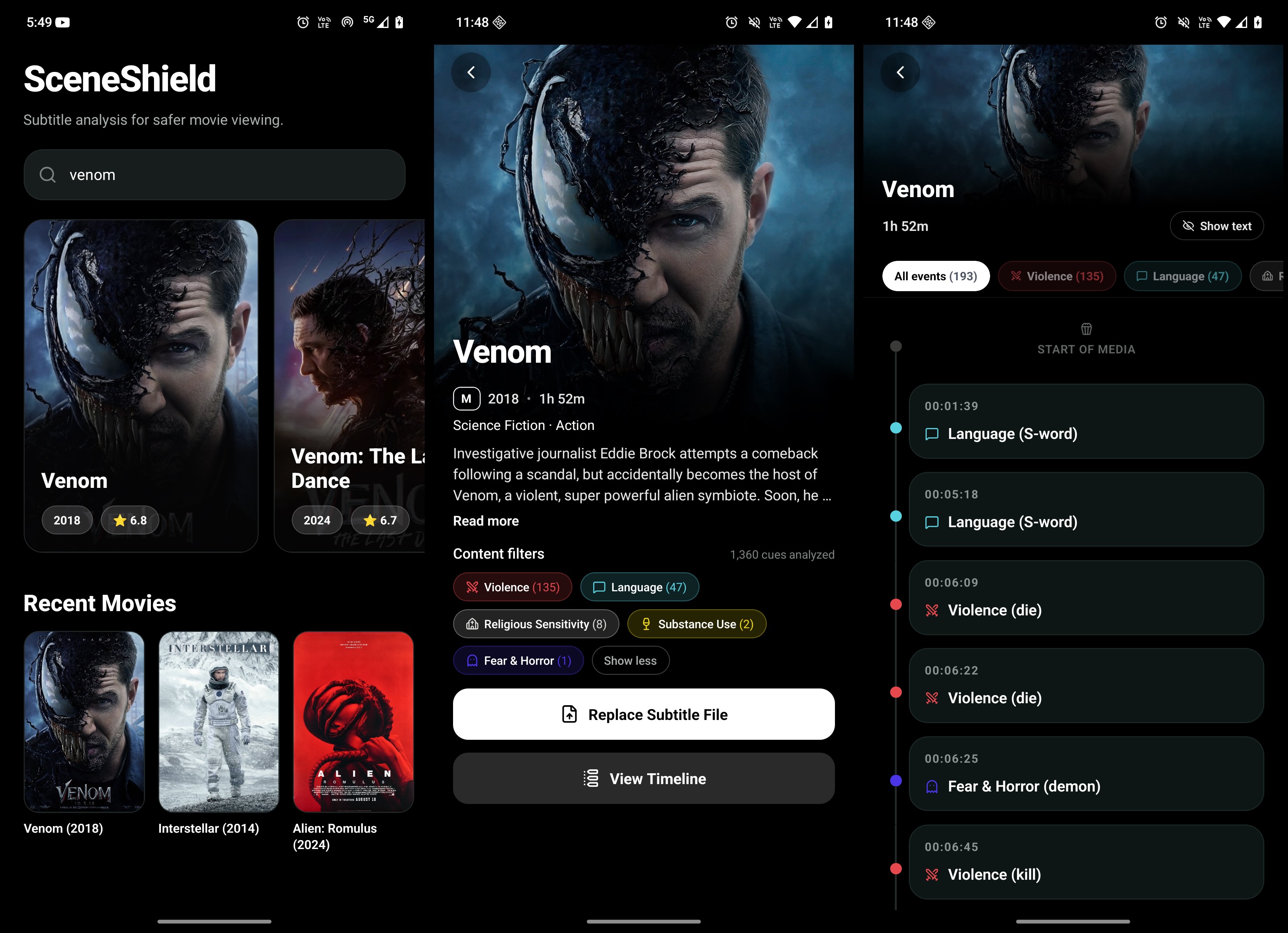
The app currently focuses on subtitle-based language analysis. It integrates with TMDb for movie metadata, allows importing local .srt subtitle files, parses subtitle cues and timestamps, and can currently flag potentially explicit or offensive language found in subtitle dialogue.
The longer-term goal is to make SceneShield a lightweight, privacy-friendly companion for families who maintain their own movie libraries and want better visibility into the content they’re about to watch together.
Tech Stack
React Native • TypeScript • TMDb API
Current Features
- TMDb Movie Search: Search movies using the TMDb API with dynamic metadata and artwork.
- Streaming-Style Movie Detail Screen: Rich movie details including title, runtime, genres, backdrop image, and age rating.
- Local SRT Import: Import subtitle files directly from the device.
- Subtitle Cue Parsing: Extract subtitle cues, timestamps, and dialogue text from standard
.srtfiles. - Subtitle Language Analysis: Scan subtitle dialogue for potentially explicit or offensive language.
- Language Event Detection: Identify subtitle cues that contain configurable language-related keywords and prepare them for timeline-based review.
- Cross-Platform Architecture: Designed to run on both iOS and Android from a shared React Native codebase.
How SceneShield Works
The workflow is intentionally simple:
- Search for a movie using the integrated TMDb search.
- Open the movie’s detail screen to view metadata and artwork.
- Import a matching
.srtsubtitle file from your device. - SceneShield parses the subtitle cues and analyses the dialogue for language-related keyword matches.
- The app identifies potentially sensitive content categories and prepares a timeline-ready analysis model.
For example, importing the subtitle file for Venom (2018) produced a number of language-related detections based on subtitle dialogue, demonstrating that the parsing and keyword-matching pipeline is already capable of processing real-world subtitle files containing more than a thousand cues.
Planned Features
- Interactive Timeline & Manual Review: Browse detected subtitle events by timestamp, add or remove custom events, and keep personal annotations stored locally on the device.
- Customisable Language Filters: Enable, disable, or adjust the sensitivity of language-related keyword detection.
- OpenSubtitles Integration: Download subtitle files directly within the app.
- Bring Your Own API Keys: Configure personal TMDb and OpenSubtitles API keys through a Settings screen, with credentials stored securely on-device.
- Fully Local Workflow: Keep subtitle files, analysis results, and user-created timeline events entirely on the device after they have been downloaded or imported.
- Additional Subtitle-Based Categories (Experimental): Explore broader subtitle-only detection for themes such as violence, horror, or substance references, while clearly distinguishing these from actual scene or video-content analysis.
- Open-Source Release: Publish the project as open source so users can use their own API credentials and keep all analysis data under their own control.
Why I’m Building It
This project is primarily an opportunity to explore React Native, TypeScript, and cross-platform architecture through a real-world problem that is personally useful to me.
Rather than being a production-ready parental-control app, SceneShield is currently an ongoing experiment in subtitle parsing, local-first data handling, and streaming-style mobile UI design. The timeline and manual-event features are the next major pieces of the puzzle, and they’ll make the app much more useful for reviewing movies before watching them with family.
